


Android Agenda Widget: Stay on Schedule!
Android Agenda Widget is a completely customizable homescreen calendar that will make sure you don’t forget any meetings, birthdays, or appointments!
- Version: 1.2.0
- Size: 416KB
- Category: Productivity
- Price: Free

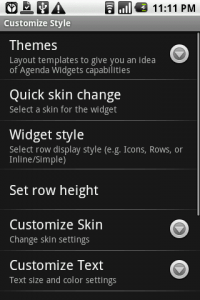
This calendar widget comes with support for Google Calendar, some corporate calendars, and the Astrid Task/To do List app. One of the first things you’ll notice about this widget is its great user-interface and its large list of customization options. You’ve got options for different layout themes, skins, widget sizes/styles, text sizes, click customizations, and a whole lot more. You can definitely tailor this widget to fit exactly what you want.
Clicking on an event from the widget brings up the detailed view which includes all of the pertinent information like date, time, location, description, attending?, and stored reminders. Additionally, adding an event is as simple as clicking the ‘+’ button on the widget itself. Since the widget syncs directly with the calendars you setup, information added from your phone will be imported directly into the original source calendar as well.
Pros:
- Advanced customization options to personalize the widget’s appearance and functionality
- Attractive user-interface complements your homescreen
- Multiple calendar support with two-way sync
- Active developer constantly striving to improve widget from your feedback
Areas for improvement:
- Possible compatibility issues with Droid (unconfirmed)
Conclusion: One of the best calendar widgets for Android. Now you can stay up-to-date directly from your homescreen!


Top Android Widget: Fancy Widget
Fancy Widget adds a beautiful look and feel to your homescreen, while providing you with the time, date, current weather, and forecast!
- Version: 1.2.1
- Size: 1.24MB
- Category: News & Weather
- Price: Free
First off a quick note: Make sure to exclude Fancy Widget from your Task Manager kill list, otherwise the widget will no longer update.


List of features:
- Clock with 12 or 24-hour formats
- Current weather/temperature (based on geolocation)
- Weather forecast
- Configurable refresh interval and links to apps from clicking the widget
- Landscape mode support
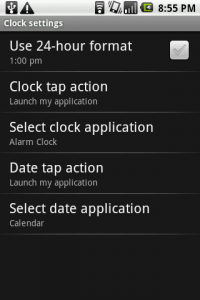
In order to change the settings, open the app from the apps list (not the usual method for widgets). One of the best functions of this widget is that you can choose what apps you would like to open by clicking on the clock, date, and weather. For example, I have the clock linked to the Alarm Clock for quick access. I also linked the date to my Calendar to quickly see my list of meetings/appointments for the day. Lastly, clicking the current weather icon will bring up the forecast for the next four days. Now this is all available from my homescreen!
Pros:
- Completely configurable, i.e. linking to other apps directly from clicking the widget
- Elegant UI that complements your homescreen/wallpaper
- Time, date, current weather, and forecast all in one place
Areas for improvement:
- Takes up a 4×2 chunk of your homescreen
- May slow loading of the homescreen on older phones
Conclusion: A beautiful widget that encompasses multiple functions all-in-one. A definite complement to your homescreen!


Top Android Widget: Data Counter Widget
Keep track of your data usage with the Data Counter Widget and never go over your monthly data limit again.
- Version: 1.3.2
- Size: 91.04KB
- Category: Tools
- Price: Free

Place the widget on your home screen (discreet 2×1 and 1×1 sizes) and have your data download/upload totals for WiFi, 3G, and even Bluetooth tracked without any fuss on your part.

Tapping on the widget brings up usage statistics.

In the settings you can pick what usage data is displayed on the widget, including a custom monthly start date which allows you to track your data over your monthly billing period and reset the data displayed on a set date of your choosing each month. You can also set the widget update rate which ranges from 1 minute to 30 minutes.
Pros:
- Very simple to use—put it on your homescreen and forget about it
- Able to set custom monthly start date to track usage for your specific billing period
- It’s Free!
Areas for improvement:
- Set a data allowance and have a notification warn you as you near it.
Conclusion:
With the looming threat of the elimination of unlimited data plans, this widget becomes even more necessary. If you want to avoid going over your data limit or just want to know how much you actually use a month, this is a fantastic and useful tool. Go ahead and stream your media without the guess work how much data you’re using.


Top Android App: Smooth Calendar Widget
The stock Google Calendar widget just wasn’t doing it for me anymore. A great calendar widget needs to look clean, display multiple upcoming events, and have added functionality. Smooth Calendar brings you all of this and more.
Version: 0.9.5
Size: 34.68 KB
Category: Tools
Price: Free
Overall Score: 4.6/5
User Interface: 4.5/5
Ease of Use: 5/5
Customizability: 4.5/5
Originality: 4/5
Indispensability: 5/5
Smooth Calendar is a simple and attractive calendar widget. Because you have an Android phone setup with your Google account, the widget will sync your calendars automatically. As for options, you choose which calendars you’d like it to display, the number of days you’d like it to check for events, whether you want 1 or 3 events displayed, and more. There are some further customizations offered, but even more would be preferred (i.e. ability to change color and size of widget for starters).
In order to access some basic features, tap the calendar. This will give you the option to refresh the calendar, open the full Google Calendar, and setup configuration settings.
There isn’t a whole lot more to say about this app other than it gets the job done. It is one of the best calendar widgets currently offered and looks great on the home screen. Try it out!
Scan the QR code with Barcode Scanner for the direct link in the Android Market. If you are reading from your Android phone, click the QR code instead.
Read More
Top Android App: Snowstorm Weather Widget
Application: Snowstorm Weather Widget


![Best Android Apps Review Google+ Page [Giveaway – OVER]](../../../../wp-content/uploads/2011/07/Top-Android-App-Google--Icon-40x40.png)


