


Top Android App: Epicurious Recipes
If you’re looking to eat-in and need some exciting new recipes to inspire you, check out the Android app for the award-winning food site, Epicurious.
- Version: 1.0.1
- Size: 4.03MB
- Category: Lifestyle
- Price: Free
The Epicurious app opens up to a very attractive UI with suggested categories that you can browse as well as a convenient search button. Recipes are included from popular magazines like Gourmet and Bon Appetite, as well as renowned chefs, restaurants, and cookbooks. When you’ve found a meal/snack/dessert that sounds appetizing, select it to view a picture, read user reviews (including the % that would make the dish again), and checkout the full recipe (including description, ingredients, and preparation instructions).
If you like what you’ve found, click the grey plus button for options including adding the recipe to your favorites, to your shopping list, or share it via email. The shopping list is one of the best features of this app. Based on what dish you have selected, the shopping list will break up the ingredients into related food types (i.e. dairy, nuts/spices, etc.) and each item is checkable, that way you won’t need to create the list yourself and you won’t forget anything! This really makes cooking new dishes very simple.
Pros:
- 25,000+ recipes to choose from
- Exceptional UI
- Shopping List makes buying proper ingredients very simple
Areas for improvement:
- No option to use different measuring systems
- Force close issues on some devices
- Many recipes do not have pictures
Conclusion: For anyone tired of the same meals, Epicurious makes it easy to spice things up!
Read More
Top Android App: Ultimate Stopwatch
Ultimate Stopwatch is a graphical stopwatch and countdown timer.
- Version: 3.1.2
- Size: 229KB
- Category: Lifestyle
- Price: Free
- Overall Score: 4.6/5
This app is great for timing or counting down to anything! The graphical interface is very appealing, and makes it rather fun to use. Previous updates to this app have improved the animation so that it uses much less battery than before. Additionally, the app can run in the background and alert you when it is complete (for the countdown timer).
To start or pause the timer, simply touch the stopwatch. The reset button in the upper right-hand corner will clear the timer and all lap-times. In order to record a lap-time in the first place, tap the bottom of the screen while the timer is running. Recording lap-times won’t stop the timer, so keep going!
To switch between stopwatch and countdown modes, just hit menu.
Pros:
- Aesthetic user interface
- Simple to use
- Allows lap-time recordings
Areas for improvement:
- No saved timings
- Can’t perform multiple timings at once
Conclusion: Definitely a handy app to have at your disposal. Awesome graphic interface to boot!
Top Android App: Flip2Silent
Flip2Silent is a simplistic app that allows you to escape those embarrassing situations when your phone rings at the most inopportune moments.
- Version: 1.0.1.5
- Size: 528KB
- Category: Lifestyle
- Price: $1.49
- Overall Score: 4.6/5
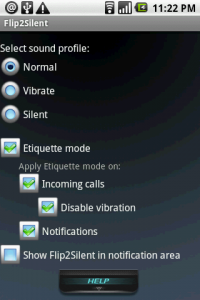
With Flip2Silent’s etiquette mode, you can quickly mute incoming calls/notifications by placing your phone face down. The response time is very impressive, with almost no lag between flipping your phone and silencing your phone.
You can also quickly change your sound profile to normal, vibrate, or silent. You can also customize exactly what you want the etiquette mode to regulate. While using this app, I had all options activated so that flipping the phone over would mute incoming calls and notifications along with disabling the vibration. Furthermore, you can add an icon in your notification bar if you’d like quick access to the app’s options (however, I think for more settings control, Quick Settings is the way to go).
Pros:
- Extremely responsive, instantly mutes your phone
- Simple implementation and usage
Areas for improvement:
- Keep it simple! Maybe replace with a widget for quick access.
Conclusion: Definitely worth a download if you’re someone who often forgets to silence their phones!

Top Android App: Zillow Real Estate
Are you in the market to buy/sell/rent a home or apartment? Or are you interested in real estate and want to educate yourself? Then lucky for you, Zillow.com has just released their official Zillow app for Android, with many great features.
Application: Zillow Real Estate
Version: 1.0.2
Size: 234KB
Category: Lifestyle
Price: Free
Overall Score: 4.6/5
User Interface: 5/5
Ease of Use: 5/5
Customizability: 4.5/5
Originality: 4.5/5
Indispensability: 4/5
Zillow Real Estate offers you the ability to see Zestimate home values, homes for sale, homes for rent, and more. You can use voice search, as well as your GPS, to search for homes.
When you open the app, your GPS location will be displayed on the layered map. You’ll notice different colored icons representing homes for sale, rent, etc. If you’re interested in a nearby location, just swipe the screen to move the map and the housing information will automatically update for you.
If you’ve found a home you’d like more information about, simply click the icon hovering over it. You’ll be given the address, the sale price, the # of beds/baths, and the square footage.
Then, if you’re further intrigued, click the info box for the full listing. Here you’ll find even more valuable information that will help you make an informed decision. For one, you’ll be able to see the Zestimate chart over different time periods so you can see the price fluctuation. Also, you’ll be able to see property tax information (where applicable), comparable sale prices in the area, and realtor information. Additionally, check out the street view from Google if you want to see a view of the rest of the neighborhood.
Furthermore, if you’re only in the market for a specific price range or # of bedrooms, apply filters to help ease your search.
Try out Zillow Real Estate from the Android Market today! Scan or click the QR code below for instant access. Let us know if this helped you make a decision on where to move or how much to pay for your new place!
Read MoreTop Android App: OpenTable
Application: OpenTable


![Best Android Apps Review Google+ Page [Giveaway - OVER]](../../../../wp-content/uploads/2011/07/Top-Android-App-Google--Icon-40x40.png)


