
Quadrant is a CPU, I/O, and graphics benchmark. It’s a great way to test the performance of your phone and compare it to other Android devices.
- Version: 1.0-beta7
- Size: 868KB
- Category: Tools
- Price: Free
Because it is based on a wide range of criteria, Quadrant Standard functions as a great all-around benchmarking tool. Note: This app may not work properly on phones without a GPU (Spica, HTC Tattoo). Also, it may not be used for commercial purposes (i.e. to advertise one phone as being superior to another).
When you open the app, you’ll see you can run a full benchmark and/or view system information. The system information is quite comprehensive and includes device, CPU, Memory, OpenGL, Sensor, and OS details.

Full benchmark tests:
- CPU
- Memory
- I/O
- 2D and 3D graphics
After the series of benchmarking tests are completed, your results will be displayed alongside the results from other users/devices. Needless to say, my G1 doesn’t really compare to the latest and greatest devices.

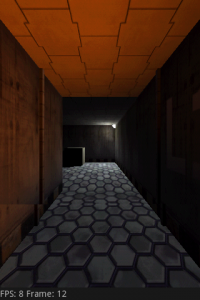

Also not too much of a surprise, the Nexus One running Android 2.2 is by far the best performer. However, the Nexus One running <2.2 scored much lower. Definitely a tribute to the latest version of Android.
I’m very interested to see what kind of results over-clocked users get with their devices. Share your scores in the comments below!
Pros:
- Benchmark tests only take a couple minutes
- App is very easy to use
- Results are shown in comparison to other Android devices
- Detailed system information available
Areas for improvement:
- More comprehensive results, instead of just an overall score (look for the full/pro version in the near future to have this)
Conclusion: An all-encompassing app for comparing Android phones, download and see where your phone lands!


So, what’s one of the most popular things people do with their Android devices? Or smartphones in general? They use Facebook and Twitter. Android has been graced with only one real Facebook app, the official one-which leaves a lot to be desired. However, we have an INSANE amount of Twitter apps (a dozen plus!) available in the Market.
How does LG Socialite for Android differ from the pack? It COMBINES Facebook and Twitter into one easy to use, easy to see, easy to navigate full-screen widget. Check out a couple of screenshots here, and more after the break!
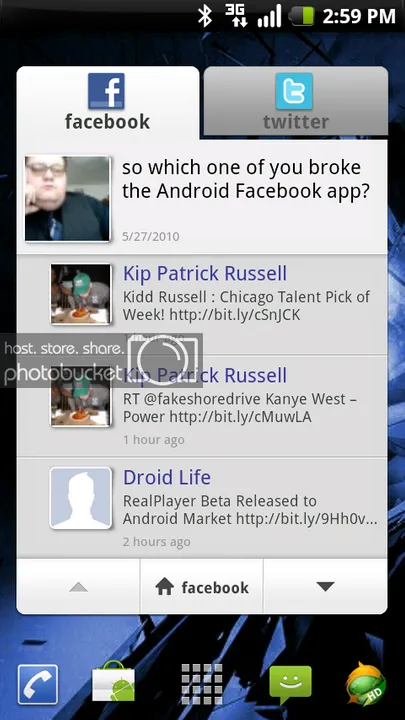
[LG Sociallite Facebook home tab]
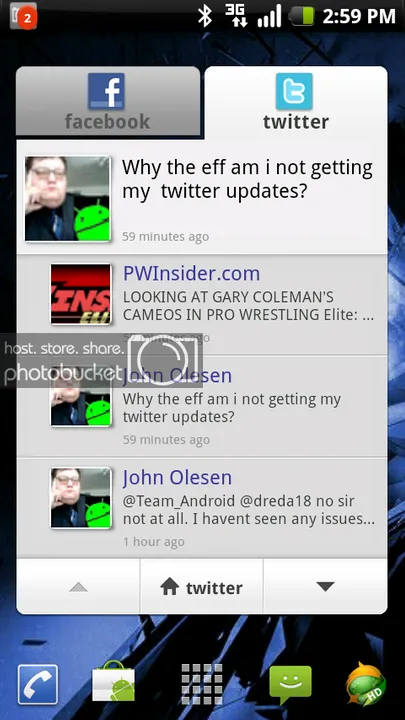
[LG Sociallite Twitter home tab]

Not sure where or maybe what you want to eat? Grab urbanspoon (yes, it’s all lowercase), the highly popular app now available on Android. Note: currently only available to Android 2.0+
- Version: 1.03
- Size: 412KB
- Category: Tools
- Price: Free
urbanspoon allows you to select dining by location, cuisine, cost, popularity and “features” (e.g. if delivery is available). The entry display features the “shake” screen made famous in the Apple ads. With it, you can choose to lock any of the three slot wheels seen above, or let the app choose all three for you. You can either press the shake button or literally shake your phone to spin the wheels (hey, that’s half the fun of using this thing).
Here’s a result screen from the shake option.
If you want to be more specific in your choice, you can navigate to the browse option and look at results by proximity, city, or choose a more specific way of searching.
When you finally do make a choice, you’re presented with a synopsis of the facility, as well as reviews and other results. One of the cool features is a rating screen. When you select a restaurant, if you click the food style under the “Menu” section, you can find a percentage rating of comparable restaurants.
There really are far too many features to cover in this short review, so go collect this sharp little app and spend some time clicking around in it.
Pros:
- Simple to use
- Variety of search methods
- Covers USA, Canada, UK and Australia
- Allows users to add their own review
Areas for improvement:
- Can’t save favorite picks
- Doesn’t actually deliver the food
Conclusion: Essential app for the road!


