


Top Android App: Google Gesture Search
Google has recently released it’s latest app from Google Labs, Gesture Search. With this new app you can search contacts, bookmarks, applications, and music by writing letters directly on your screen! Currently only available for Android 1.6.
Application: Gesture Search
Version: 1.0.1
Size: 598KB
Category: Tools
Price: Free
Overall Score: 4.7/5
User Interface: 5/5
Ease of Use: 5/5
Customizability: 4.5/5
Originality: 4.5/5
Indispensability: 4.5/5
Search by gesturing anywhere on the screen. You can use upper or lower case letters and one or more strokes. Search results are continuously updated as you add or remove more letters. You can gesture directly on top of the search results list or scroll the entire list. You can activate a search result by clicking on it. For a contact phone number, just click the green phone icon like you normally would. Also, it’s possible to search with prefixes, so if you’re looking for Google Maps, just gesture “G M.” To make a space, draw a horizontal line on the search result list.
In order to delete a letter, just draw a line from right to left in the query box at the bottom of the app screen. If you’d rather just delete everything you have written, draw a line from left to right.
The settings are very comprehensive and help to personalize the app. If you’re a little slower between writing strokes, decrease your writing speed. If you only like to gesture search for contacts, remove the other options from the searchable items list. Lastly, you can adjust the privacy settings to clear your search history and turn on/off Google’s gesture data collection.
Other than that, you should be good to go right off the bat! There isn’t much to Gesture Search, it’s very simple to use.
Eventually, it would be nice to have Gesture Search functionality independent of an actual app. The point of Gesture Search is to help you quickly find what you’re looking for. However, if you have to open a dedicated app in order to use it, it detracts from the speed of the process. It might be nice to see a widget with this ability, so that you could quickly get the information you need from your homescreen. We’ll see what comes of Gesture Search, but hopefully it continues to be developed!
Try it today from the Android Market!
Read MoreTop Android App: Sweet Dreams (ADC2 Winner)
If you’re like me and hate getting woken up at night because you forgot to silence your phone, worry no more! With the ADC2 Winner, Sweet Dreams, you can set the parameters you’d like to use in order to silence your phone when you don’t need it.
Version: 2.11
Size: 0.90MB
Category: Tools
Price: Free
Overall Score: 4.9/5
User Interface: 5/5
Ease of Use: 4.5/5
Customizability: 5/5
Originality: 5/5
Indispensability: 5/5
“Sweet Dreams is a revolutionary tool that will finally allow you to go to sleep without worrying about changing your phone settings in order to avoid unwelcome late night calls. Just set your filters (location, movement, or sound) and Sweet Dreams will do the job for you.” - Android Market description
When you open the app, you initially have two options, ‘Enable’ and ‘Settings’. It’s suggested you hit Menu > Help and read the short overview of how the app works to get a good idea about its features before starting.
Pressing the ‘Settings’ button brings you to the master controls of the app. In the General tab, you can set your phone’s ‘Sleep Mode’ settings. This lets you decide the ring mode, the screen timeout length, and whether or not the WiFi and Bluetooth connections are disabled when your phone is put to sleep. Also, in this tab you can set the scheduled times for when ‘Sleep Mode’ should be enabled. My current ‘Sleep Time’ is 12:30AM and ‘Wake Up Time’ is 7:30AM.
In the Location tab, you can choose a specific area where Sweet Dreams will operate so that if you’re not at home, the app won’t active ‘Sleep Mode’. Your location will be periodically checked while in ‘Sleep Mode’ so that if your location changes, your phone will be set back to default mode. Note: Sweet Dreams uses wireless networks signals, so you’ll need this activated in Settings > Security & location.
In the Motion tab, you can choose for the app to determine whether or not your phone is being moved. With this filter activated, your phone will only go into ‘Sleep Mode’ if it is still. You can also set the threshold of movement that will deactivate ‘Sleep Mode’ so that you’ll be able to check the time at night without waking up your phone.
Similarly to the Motion tab, the Sound tab allows you to set a filter where your phone will only go into ‘Sleep Mode’ if it’s silent around you. Furthermore, you can set the threshold of sound you’d like to use. This is handy for people that live in noisy environments.
When ‘Sleep Mode’ is activated, you’ll see an icon in your Notification Bar. This allows you easy access to disabling ‘Sleep Mode’ if you happen to wake up early.
One feature that would be nice to see added is an option to disable sync. This way your phone doesn’t waste battery syncing email, RSS feeds, etc. when you don’t need them. Also, it’d be nice to set ‘Sleep Time’ and ‘Wake Up Time’ for different days of the week, since most people don’t go to bed and wake up at the same every day of the week.
Overall, Sweet Dreams is a classic Android app that has major staying power. The user interface is reminiscent of Seesmic (tabs) and very easy to use. Thankfully, no more disrupting calls or texts when you don’t want them. Also, don’t worry about forgetting to disable WiFi or Bluetooth before going to sleep. There’s no doubt why this app won the Android Developer Challenge 2, so check it out for yourself!
Read More
Top Android App: Smooth Calendar Widget
The stock Google Calendar widget just wasn’t doing it for me anymore. A great calendar widget needs to look clean, display multiple upcoming events, and have added functionality. Smooth Calendar brings you all of this and more.
Version: 0.9.5
Size: 34.68 KB
Category: Tools
Price: Free
Overall Score: 4.6/5
User Interface: 4.5/5
Ease of Use: 5/5
Customizability: 4.5/5
Originality: 4/5
Indispensability: 5/5
Smooth Calendar is a simple and attractive calendar widget. Because you have an Android phone setup with your Google account, the widget will sync your calendars automatically. As for options, you choose which calendars you’d like it to display, the number of days you’d like it to check for events, whether you want 1 or 3 events displayed, and more. There are some further customizations offered, but even more would be preferred (i.e. ability to change color and size of widget for starters).
In order to access some basic features, tap the calendar. This will give you the option to refresh the calendar, open the full Google Calendar, and setup configuration settings.
There isn’t a whole lot more to say about this app other than it gets the job done. It is one of the best calendar widgets currently offered and looks great on the home screen. Try it out!
Scan the QR code with Barcode Scanner for the direct link in the Android Market. If you are reading from your Android phone, click the QR code instead.
Read MoreTop Android App: SMS Popup
SMS Popup is an extremely customizable app that offers you features to improve your SMS/MMS efficiency. The most useful feature is the popup dialog box which allows you to quickly reply whenever you receive a new message.
Version: 1.0.6
Size: 320KB
Category: Tools
Price: Free
Overall Score: 4.8/5
User Interface: 5/5
Ease of Use: 5/5
Customizability: 5/5
Originality: 4.5/5
Indispensability: 4.5/5
SMS Popup is a must-have extension to your standard text messaging app. The user interface is aesthetically pleasing and functional. When you receive a new text message, a dialog box will popup with the message, who sent it, and the options to Reply, Close, or Delete the message. When you choose to reply (with the Quick Reply option activated), you can respond directly from the popup. Even more awesome, you can use the voice button to use the speech-to-text feature. I tested this out a few times and it works quite well. Great for when you’d rather not workout those thumbs.
Furthermore, the app comes with an extensive list of customization features. A very nice (and unique) feature is the ability to customize individual contact notifications. With this feature, you can have SMS Popup ignore certain contacts, play a specific ringtone, blink a particulr LED color/rate, and more. Now you can know who is texting you before even unlocking your phone.
Note: If you are hearing/seeing multiple messaging notifications, check that you have disabled notifications in your other text messaging apps. Additionally, if you have any questions about the app or need some how-to help, the developer has a wonderful FAQ page. SMS Popup FAQ page.
Scan the QR code with Barcode Scanner (or click the QR code if on your Android phone) to access SMS Popup in the Android Market.
Read MoreTop Android App: Screebl Lite
If you’re looking for a great way to save battery life with your Android phone, Screebl is your answer. Screebl uses the orientation and activity of your Android phone to determine if it’s in use. If not, the screen will timeout and save your battery. A great app idea and executed to perfection.
Version: 1.9.0
Size: 443KB
Category: Tools
Price: Free (Pro: $1.99)
Overall Score: 4.9/5
User Interface: 5/5
Ease of Use: 5/5
Customizability: 4.5/5
Originality: 5/5
Indispensability: 5/5
As stated by the developer, “Screebl is an app that controls power saving features of your phone based on orientation.” Now you can avoid your screen from timing-out when you’re using your phone. Similarly, you can save battery by having your screen time-out when you’re not using it.
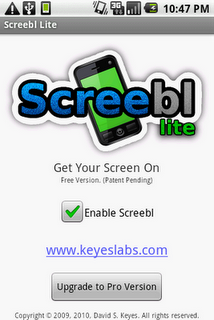
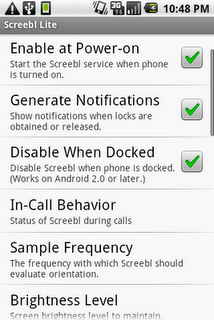
The customization that comes with this app is quite extensive; and not in an overwhelming way but in a “I want this app to work exactly as I say” kind of way. You can configure the orientation (for both portrait and landscape mode) in which Screebl will check to see whether your phone is in use. I’ve been using the standard settings, where the app only considers no movement in the 0-5 degree range (laying flat) as being not in use. This way if I have my phone prop’d up or am holding it still to watch a movie, the screen won’t time out. You can change these orientation settings to fit your preferences.
Furthermore, you can edit Screebl’s in-call behavior, sampling frequency, and a lot more.
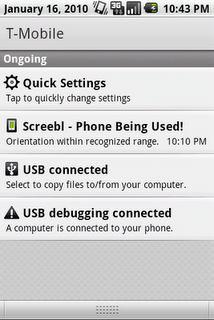
A feature I have come to value is the icon of a small smartphone that is placed in your notification window. When the screen is green, that tells you Screebl considers your phone in use. When it’s clear, Screebl considers your phone not in use and the screen will then time-out shortly.
After using this app, I can say that I have noticed an improvement in my battery life. I oftentimes forget that my phone is sitting on my desk with the screen unlocked (and since I don’t like short screen time-outs, mine is set to 10 minutes), so my battery can drop quickly. Screebl is perfect if you’re forgetful like me.



![Best Android Apps Review Google+ Page [Giveaway - OVER]](../../../../wp-content/uploads/2011/07/Top-Android-App-Google--Icon-40x40.png)


