


6 Must-Have Android Apps for Rooted Devices
If you have a rooted Android phone or tablet, these 5 apps are essential for protecting and enhancing your experience. If your Android device is not rooted (and you’re not interested in rooting), you can ignore the app list below since they require root access.
Note: If you’re interested in rooting and want more information, check out the XDA-Developers forums (Android app).
1. Superuser
- Version: 2.3.6.1
- Size: 192KB
- Category: Tools
- Price: Free
Superuser requires that you have already rooted your Android device before it can be used. It is essential for granting and managing Superuser rights for your phone (allowing other apps to gain root access so that they can function properly).


2. Titanium Backup
- Version: 3.6.8
- Size: 1.73MB (apps2SD enabled)
- Category: Tools
- Price: Free (~$5.81 Pro version)
Simply put, Titanium Backup enables you to quickly and safely backup your current apps, settings, and other data before trying new ROMs, themes, etc. Now you can easily revert back to the stable configuration you had setup previously. Additionally, this app makes re-installing and re-configuring all of your applications a breeze. No need to search the market all over again after you install a new ROM. Another feature includes the ability to schedule regular backups to take place at defined intervals.


3. Root Explorer (File Manager)
- Version: 2.13.4
- Size: 205KB (apps2SD enabled)
- Category: Productivity
- Price: $3.95
Root Explorer allows you to access the entire file system of your Android device, even the data folder. By enabling the read/write option you can actively edit files in the Android system. This app is extremely powerful and easy to use, and should definitely be included in your app repertoire.


4. Rom Manager
- Version: 3.0.0.7
- Size: 1.52 (apps2SD enabled)
- Category: Tools
- Price: Free ($4.99 Premium version)
Rom Manager lets you flash the latest and greatest ClockworkMod recovery. You can easily manager various ROMs, organize and perform system backups, and install ROMs from your SD card or even over-the-air. One-click option to reboot into recovery is essential for manual management of your rooted device.


5. ShootMe (Screen Grabber)
- Version: 0.8.0
- Size: 0.90MB (apps2SD enabled)
- Category: Tools
- Price: Free
ShootMe allows you to take screenshots of your Android device’s screen without the need for the Android SDK and a USB connection to a computer (screenshot tutorial for non-root users). After you open this app, just give your phone a sustained shake or shout to activate the screenshot. The sound of a camera lens shutter lets you know when a screenshot has been taken. All screenshots will be saved to the ShootMe folder on your SD card and will show up in your gallery.


6. CacheMate for Root Users
- Version: 2.3.2
- Size: 144KB (no apps2SD)
- Category: Tools
- Price: Free
CacheMate lets you free up internal memory by clearing the system cache from all installed Android apps with one-click. There is a convenient feature to schedule auto-clearing of the cache at set time-intervals as well. Additionally, in the settings you can select which apps’ caches you’d like cleared or not.


App 2 SD Android App Manages Device Memory
App 2 SD facilitates the management of your Android device’s internal and external (SD card) application memory.
- Version: 1.35
- Size: 149KB (apps2SD enabled)
- Category: Tools
- Price: Free ($0.99 Pro version removes ads)
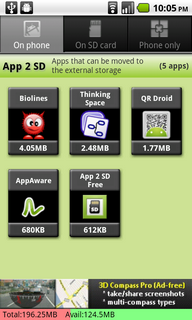
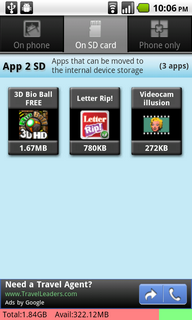
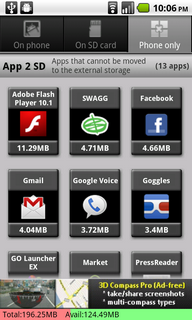
App 2 SD helps you to quickly move apps from your Android phone’s internal memory to the SD card by simplifying the process. As it stands now, you have to manually navigate the system application settings to find apps that have apps2SD enabled. Instead, this app scans your installed apps (and each app as it’s downloaded) and categorizes them as follows; apps stored on the phone, sd card, or phone only.
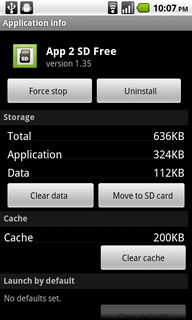
By clicking on an app listed in the “on phone” category, you’ll be taken directly to the application settings where you can move it to the sd card. Similarly, you can perform this move in reverse if your sd card is filling up. Plus, keep tabs on the available space (and total space) for both the internal and external storage with the colored status bar at the bottom of the screen.
Pros:
- Apps 2 SD management made simple
- Notifies you of movable apps as they are installed
- Clear app caches to free up more storage space
- Batch moves expedite the process
Areas for Improvement:
- Ability to sort apps by size to help decide which apps to move
Conclusion: The easiest way to manage the storage of apps on your Android device.

Calculus, Statistics, and Trig? Easy w/ the TI-83 Android App
The TI-83 Android app emulates the original Texas Instruments TI-83 graphing calculator directly on your Android device.
Note: app is now called Andy-83.
- Version: 1
- Size: 736KB (apps2SD enabled)
- Category: Tools
- Price: Free
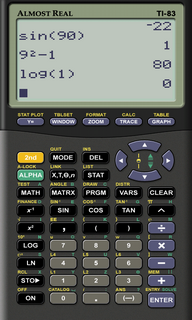
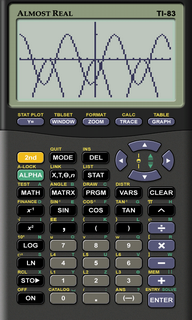
Many of you surely remember (and may even still use) the TI-83 as being the calculator of choice for high school and college math and science courses. Conveniently, this app is a fully-functional emulator, meaning it can differentiate, integrate, and plot functions all day and night. I must admit, it was rather strange seeing the identical (yet miniaturized) display on my phone’s screen.
Because of the sophistication and power of the original TI-83, this Android app will easily replace any other calculator app you may have installed on your phone. Basic addition and subtraction is as easy as graphing logarithmic functions or calculating arcsine.
What really sets this app apart is the ability to write TI-BASIC programs or save textual notes. I didn’t try to port any of the original games I have on my TI-83+, but it would be incredible to have an easy way to do this. Blockdude or Bust a Move anyone?


Pros:
- Fully-functional TI-83 graphing calculator emulator
- Ability to create and run programs as you could on the original TI-83
- Exact replica of the TI-83 interface, which is not only functional but evokes that feeling of nostalgia
Areas for Improvement:
- Relatively small size and close proximity of buttons makes input prone to error
- Option to toggle button haptic feedback
Conclusion: The one and only Android calculator app you’ll need because it does it all!


Widgetsoid: Customizable Homescreen Widgets
Widgetsoid is a fully customizable Android widget creator.
- Version: 3.1
- Size: 1.54MB
- Category: Tools
- Price: Free
To access this widget, long-press on your Android homescreen and select the size you’d like. Available sizes range from between 1*1 to 1*5 to 5*1. Once you have selected the appropriate size, then you can choose what settings you’d like to be able to toggle. The default style is similar to the “Power Control” widget that comes stock on some of the newer Android phones.
In the network section, choose from: WiFi, portable WiFi hotspot, Bluetooth, mobile data, 2G/3G, 4G, data sync, tether USB, USB storage, airplane mode. Screen section: Screen timeout, lock screen, auto lock, orientation, brightness, screen always on, and stay awake. Sound section: ring mode, volume control, media scanner, and music controls (previous, next, play/pause). Other section: GPS, battery status, flashlight, SD card, reboot (root only).
Additionally, you can create a shortcut for any Android app you have installed or for any contact.
The best feature of this Android widget is the customization/theme options for the widget itself. You can adjust the widget’s background color, status color, icon colors, corner types, etc. This is perfect for matching custom Android themes, live wallpapers, or any background image.
Once you’ve assembled the widget as you like, make sure to click the “save” button which is at the far-right of the scrollable bottom bar.


Pros:
- Fully customizable Android widget creator
- Includes nearly all critical toggle-able settings
- Edit widget theme to match your Android homescreen
- Multiple widget sizes and variations
Areas for improvement:
- Contact shortcuts need contact images
Conclusion: A customizable Android widget creator that will ease toggling settings from your Android homescreen.
[AppBrain Link] [AppBrain Link]
Android 2.x Android 1.6


Top Android App: Google Chrome to Phone
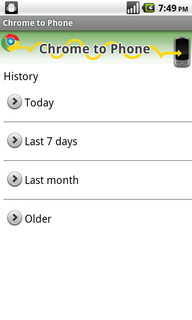
“Google Chrome to Phone lets you easily share links, maps, and currently selected phone numbers and text between your computer running Google Chrome and your Android phone.”
- Version: 2.2.0
- Size: 185.7KB
- Category: Tools
- Price: Free
Note: Google Chrome to Phone is currently only available for Android 2.2. Additionally, the Chrome browser extension must be installed from http://chrome.google.com/extensions/.
This app makes transferring bookmarks, phone numbers, text etc. extremely easy. Before, it always seemed like a hassle to add and update links in the Android browser when it had all been setup previously on a computer. Also, you can forget about having to email or share links and items with yourself in order to save them for mobile viewing.
A convenient feature enables your Android phone to automatically recognize YouTube, Google Maps, and phone number links and open them with their respective apps (rather than the browser).

Pros:
- Share links, maps, phone numbers, etc. from Google Chrome to your Android phone
- YouTube links open YouTube app, map links open in Google Maps app
- Saves plenty of time and effort involved in transferring information
Areas for improvement:
- Expand support for other Android versions and internet browsers
- Allow reverse-syncing from phone to Chrome
Conclusion: A feature-focused app that provides a simple, convenient method for sharing info from Google Chrome to your Android phone.


![Best Android Apps Review Google+ Page [Giveaway - OVER]](../../../../wp-content/uploads/2011/07/Top-Android-App-Google--Icon-40x40.png)


