


MicDroid for Android: Auto-tune and Record!
Do you have dreams of being the next Britney or T-Pain? Well neither do I, but the new app MicDroid lets you auto-tune even the most unpleasant voices. Download and hilarity will ensue.
- Version: 0.19
- Size: 81.64KB
- Category: Multimedia
- Price: Free
First off a disclaimer, this app is currently in its alpha release form, so if you run into any issues report them to the developer!
The app is a very simple one currently without many bells and whistles (at the moment). However, it performs very well already!
Here’s how to use it:
- Click the “Power Button” to begin recording your voice.
- Click the button again to stop recording. This will automatically bring up the save recording screen.
- Hit Menu > Recording Library to view all saved recordings that have been auto-tuned.
Also, you can play around with the auto-tune settings (found in the menu). For first-time and general use, the default settings actually work great. However, if you want to customize it even further, you can change the sample rate, key to tune to, pitch, correction strength, correction smoothness, etc. all to get different auto-tune sounds for your voice.
Pros:
- Simple, easy to use.
- Saves each recording you make.
- Auto-tune preferences are customizable.
- Produce entertaining, hilarious sound bytes.
Areas for improvement:
- Not every recording needs to be saved, so the constant popup after finishing a recording may be unnecessary.
- The UI could definitely use some work.
- A continuous auto-tuned output would be very useful.
Conclusion: Definitely an entertaining app that you will surely enjoy. If it can make my voice sound good, you know it works!
Read More
Top Android App: mp3tunes
Leave your iThing at home and begin your switch over to the cloud with mp3tunes and their online digital locker.
- Version: 3.0.12
- Size: 407 KB
- Category: Multimedia
- Price: Free
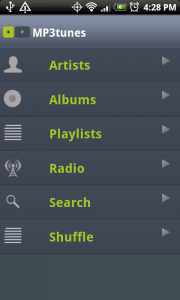
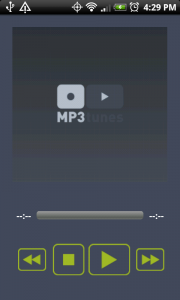
After installing the app, head over to http://www.mp3tunes.com/ and sign up for your free account. They offer 2GB of storage for free and you can apply for a free upgrade to a 10GB account. I received my invite to upgrade a couple weeks after applying.
Sync your music on your computer, including iTunes playlists, to your digital locker and you can stream them on your Android phone as well as many other internet connected devices. You can also download your files directly to your phone for local playback.
The file formats which are currently supported by the MP3tunes Locker:
Audio
- Mp3
- Mp4
- M4a
- aac
- wma
- ogg
Video
- flv
- mp4
- m4a
Please note:
- Does not playback videos on phone, only audio from them
- Does not support lossless formats
- Does not support files encrypted with digital rights management (DRM)
- You will not be able to upload or listen to ALAC, FLAC, lossless WMA, M4P or WAV files using the MP3tunes Locker.
Pros:
- Free-up to 10GB
- You can download and save your music locally on your phone
- Internet radio stations
- Shuffle all
- Set stream rate and local cache file size
Areas for improvement:
- Widget
- Album separation within artist view
- Podcast catcher/downloader
- Last.fm scrobbling
Conclusion:
If you’re looking for a way to take your music with you without taking up space on your phone or SD card then give mp3tunes a try. If 10GB isn’t enough for you, you can upgrade to a 50GB locker for $39.95/year or $4.95/month. Make sure you have an unlimited data plan or connect to WiFi before using because streaming media can use up a lot of data.

Amazon Kindle for Android Arrives
Today, Amazon announced that their free Kindle for Android application was live (for Android 1.6+). No Kindle is required. If you do have a Kindle, syncing your library, notes, marks, etc. is a breeze with Whispersync.
Features:
- Access to over 600,000 Amazon books
- Syncs with Kindle if you own one (even last page read)
- Read in portrait or landscape mode
- Order books directly from your Android phone, instant delivery
Tell us, are you a big e-book reader (previously, the best option for Android was Aldiko Book Reader)? Do you own a Kindle (or a Nook)?
Read MoreSongDNA Encodes Endless Music Information
Looking for every ounce of information on a song or artist? Want to quickly find a band’s tour dates or a song’s highest chart rank? If you answered ‘yes’ to any of these, then you’ll definitely want to download SongDNA.
- Version: 2.0.5
- Size: 0.97MB
- Category: Multimedia
- Price: Free
This app makes it easy to search by artist, song title, or both. Search results are accurate and filter what you are looking for quite well. From the screenshots below, you’ll notice that the free version is ad-supported, however a donation of $2.00 grants you access to the ad-free version.
SongDNA provides you with a large amount of useful information and entertainment all in one app. What you can expect to find:
- Song information (Albums, related Twitter vibe, lyrics, and the link to buy with Amazon)
- Artist information (biography, tour dates, releases, Twitter vibe, official artist homepage, Wikipedia page, and additional images and videos)
The app is powered by many resourceful and reputable internet sources including Billboard, LyricWiki, BBC Music, YouTube, Twitter, and Google Analytics. So you know that the information you get is correct and there will be plenty of it.
Pros:
- Twitter vibe and YouTube integrate social media buzz
- Easy navigation
- All information consolidated and organized in one place
Areas for improvement:
- User interface could use an aesthetic spark
- Certain information like lyrics take you to the outside source in the browser
Conclusion: A goldmine for any music aficionado.
Read More
Top Android App: Scanner Radio
Scanner Radio isn’t another music app, it allows you to listen to live audio from over 2,200 police and fire scanners, railroad communications, and weather radio broadcasts from around the world.
- Version: 1.6
- Size: 325KB
- Category: Multimedia
- Price: Free
Scanner Radio is an easy access type of app, allowing you to connect to all sorts of information instantly. Locate scanners based on your location, popularity, genre, etc. Additionally, you can search for and listen to scanners in locations across the country/world. This app gives you an inside look at what is going on in and around your community.
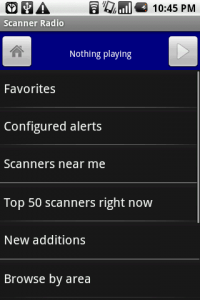
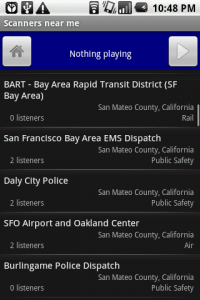
One nice feature of Scanner Radio is the ability to set the app to “sleep”. Similar to the SleepTimer app, this option allows you to predetermine how long you’d like to listen to the scanner before it shuts off. Even though it’s not exactly a soothing sound, it definitely provides interesting content/entertainment while you fall asleep. Additionally, you can set an alert for a specific scanner so that you’ll be notified when it reaches a certain number of listeners, which usually means something interesting is happening.
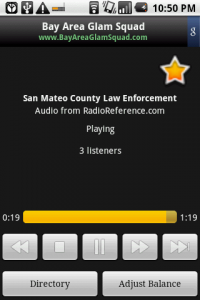
When you’ve found a scanner you want to listen to, just click it to begin streaming. From there, you’ll be able to pause, rewind, and fast-forward the audio. You can also adjust the left/right volume controls, which filter what types of information you hear. To find out what is included in the left/right filters, go to Scanner Details in the Menu.
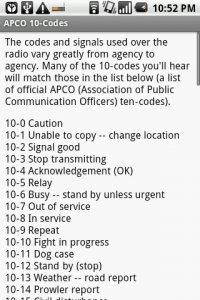
For help identifying what the common 10-codes mean (like 10-4 meaning “OK”) check the full list found in the Menu.
Pros:
- Listen in on police/fire radio calls
- Scanners available around the world
- Can run in the background without interference
Cons:
- Not all areas are supported, but this is an issue with lack of volunteers providing audio from their own scanner
Conclusion: A great resource for hearing what’s going on in your community or around the world in an exciting and new way. Now take it with you wherever you go with Android!



![Best Android Apps Review Google+ Page [Giveaway - OVER]](../../../../wp-content/uploads/2011/07/Top-Android-App-Google--Icon-40x40.png)


